# Building your Mod

You're looking to create a mod for Nitrocid KS! That's great! Make sure that you have Visual Studio installed. Follow the steps to create your first mod.

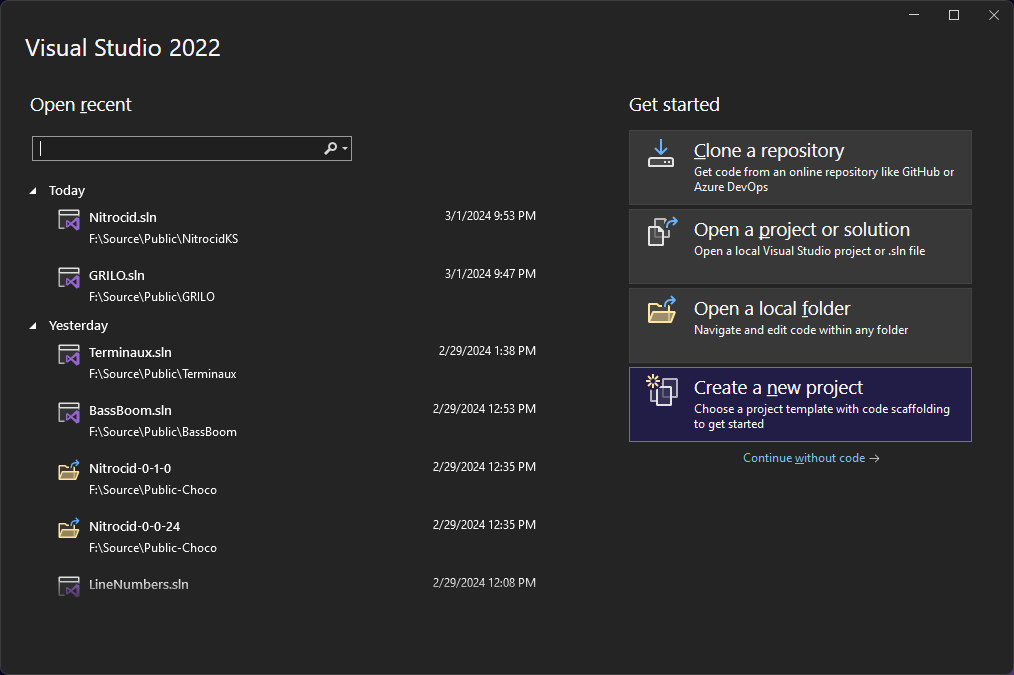
1. Press `Create a new project` on Visual Studio homepage

   <figure><img src="https://1720427397-files.gitbook.io/~/files/v0/b/gitbook-x-prod.appspot.com/o/spaces%2FJykbx4O47VXdoe2Rclr6%2Fuploads%2Fgit-blob-f489c043f6a91548dbade7aef397e5b0d5f65b7c%2F077-modbuild.png?alt=media" alt=""><figcaption></figcaption></figure>
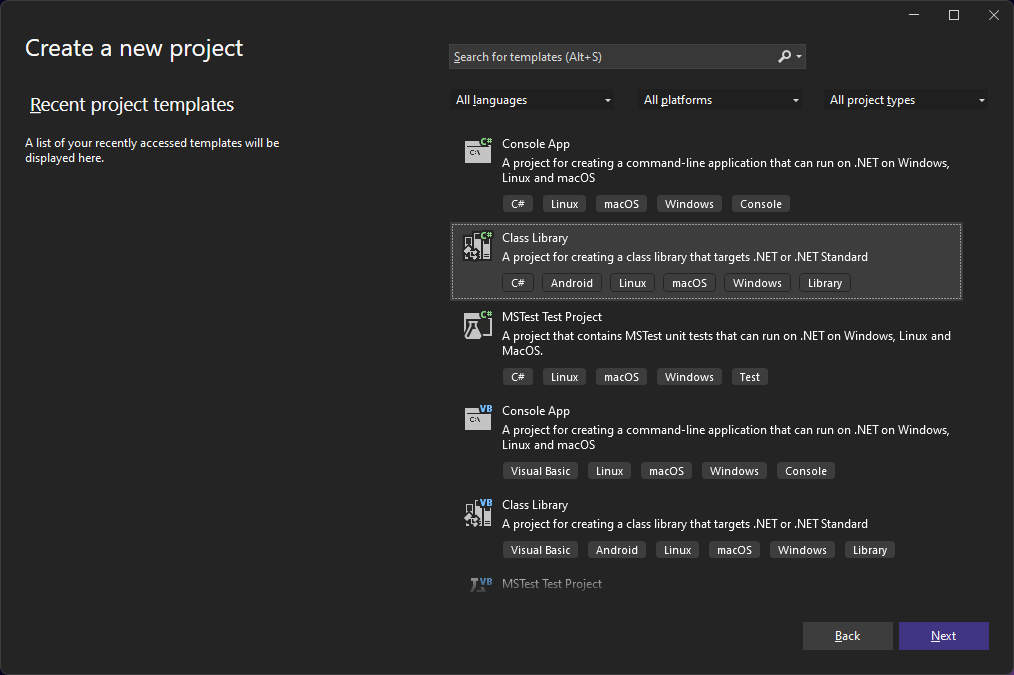
2. Find `Class Library` and double-click it

   <figure><img src="https://1720427397-files.gitbook.io/~/files/v0/b/gitbook-x-prod.appspot.com/o/spaces%2FJykbx4O47VXdoe2Rclr6%2Fuploads%2Fgit-blob-2b01aebd31d39d7cf43b68b97bdfcdbe841d3c4a%2F078-modbuild.png?alt=media" alt=""><figcaption></figcaption></figure>
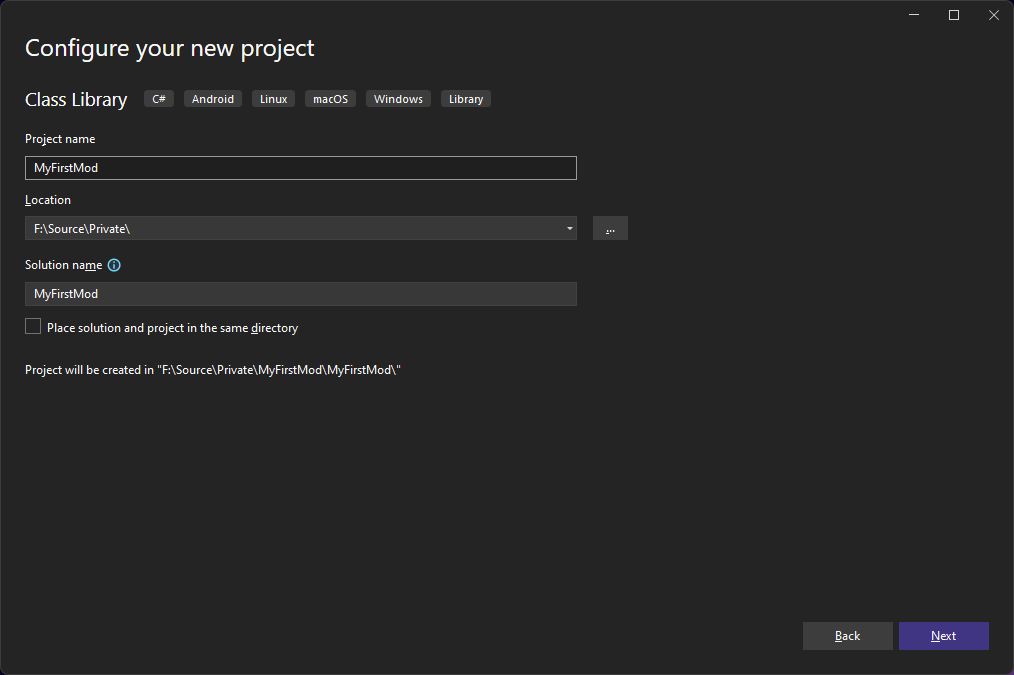
3. Write your mod name, like in our example, `MyFirstMod`.

   <figure><img src="https://1720427397-files.gitbook.io/~/files/v0/b/gitbook-x-prod.appspot.com/o/spaces%2FJykbx4O47VXdoe2Rclr6%2Fuploads%2Fgit-blob-23a94da6601344e8055986fa2cb0e5e8db5b1dff%2F079-modbuild.png?alt=media" alt=""><figcaption></figcaption></figure>
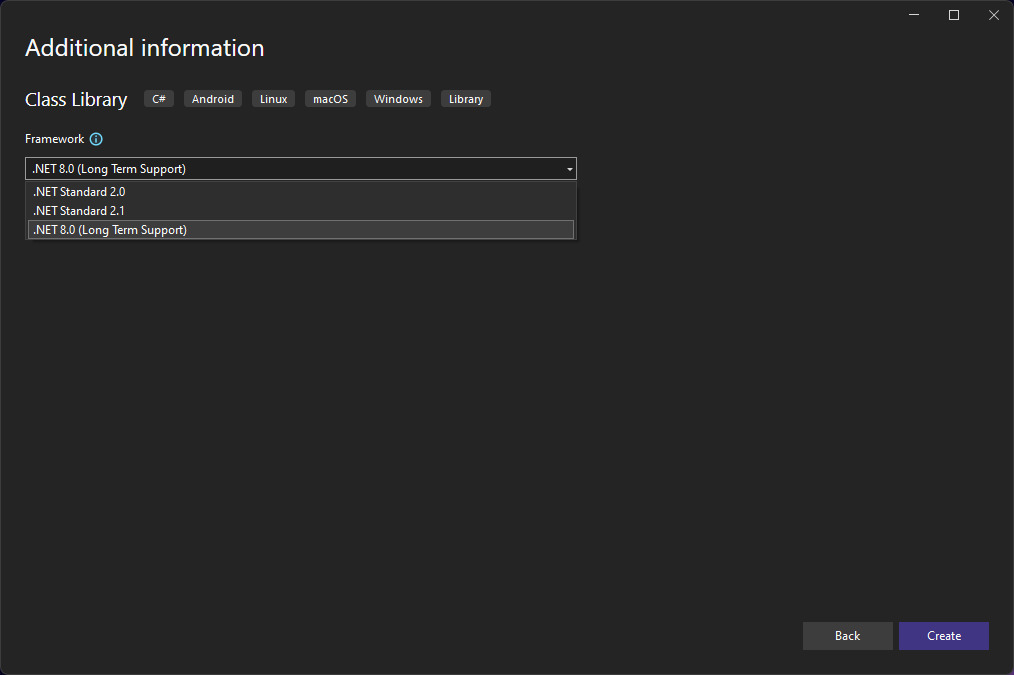
4. Make sure that `.NET 8.0` is used. Press `Create`.

   <figure><img src="https://1720427397-files.gitbook.io/~/files/v0/b/gitbook-x-prod.appspot.com/o/spaces%2FJykbx4O47VXdoe2Rclr6%2Fuploads%2Fgit-blob-9310183fd8f057d1d455752426afb6779ba37559%2F080-modbuild.png?alt=media" alt=""><figcaption></figcaption></figure>
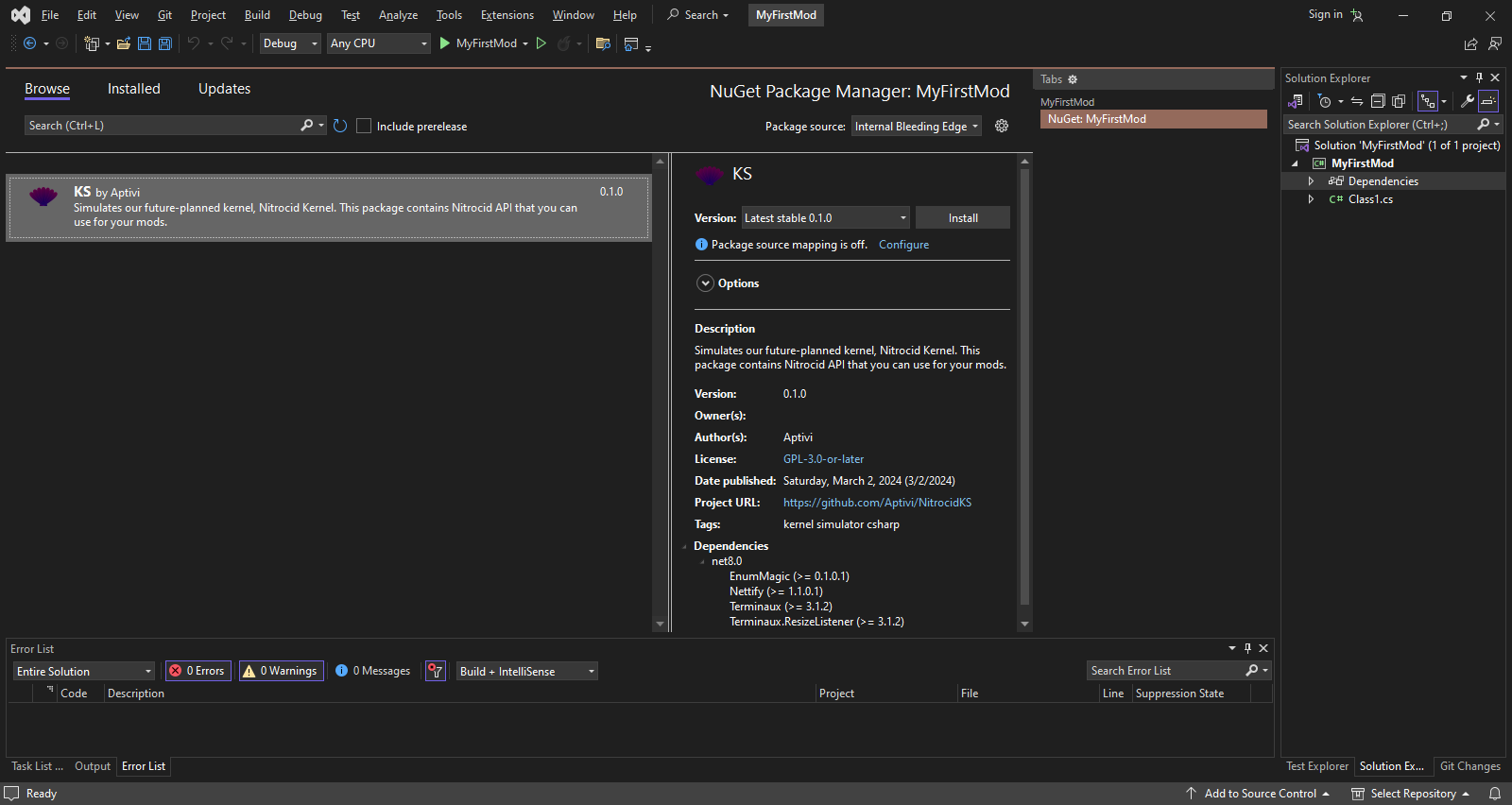
5. Right-click on `Dependencies` -> `Manage NuGet Packages`, find `KS`, and install it.

   <figure><img src="https://1720427397-files.gitbook.io/~/files/v0/b/gitbook-x-prod.appspot.com/o/spaces%2FJykbx4O47VXdoe2Rclr6%2Fuploads%2Fgit-blob-4201aad35a06c1b5a54eef743c15b021a010eb7e%2F081-modbuild.png?alt=media" alt=""><figcaption></figcaption></figure>
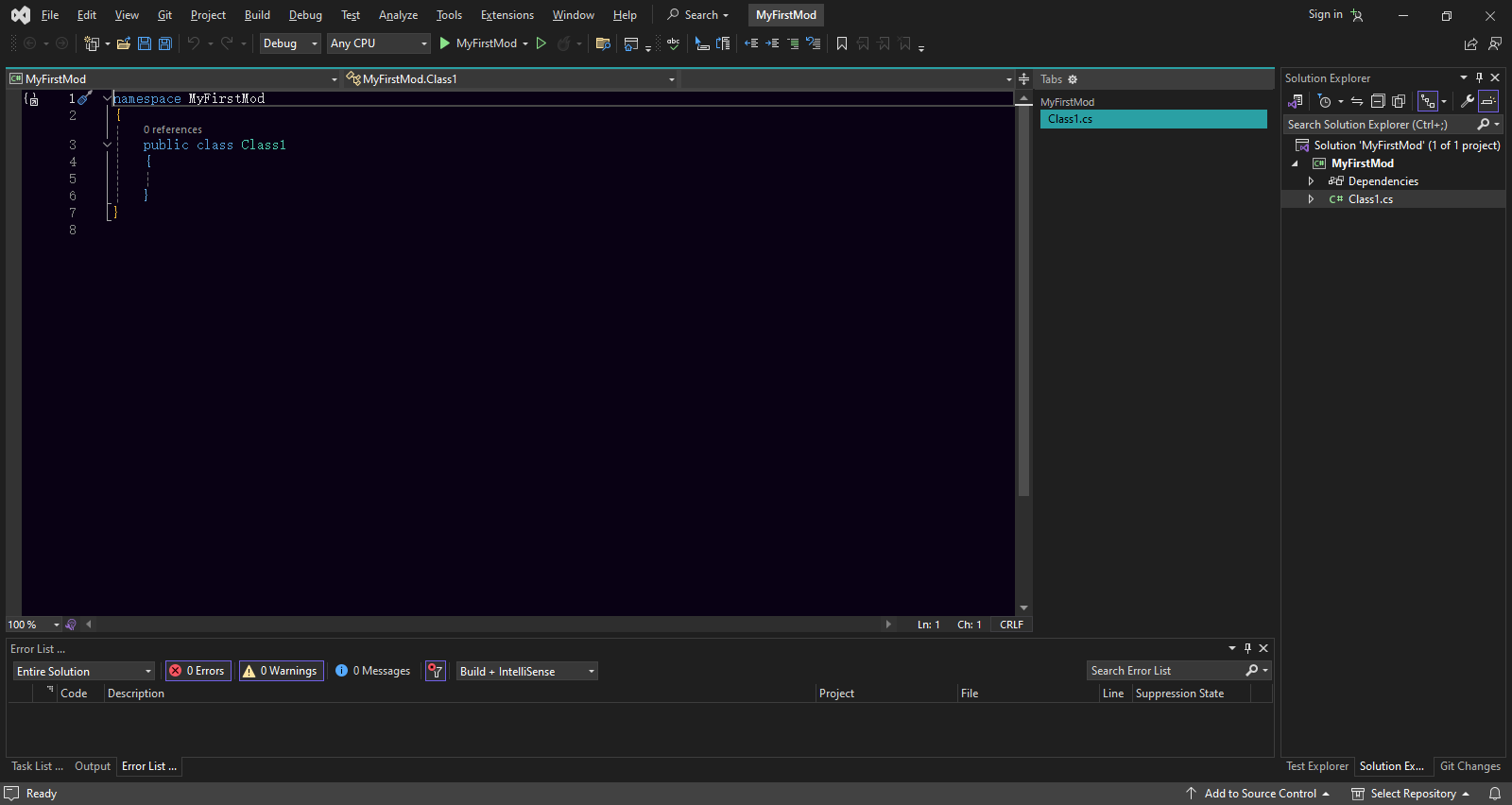
6. Once the package is installed, go to the `Class1.cs` source file

   <figure><img src="https://1720427397-files.gitbook.io/~/files/v0/b/gitbook-x-prod.appspot.com/o/spaces%2FJykbx4O47VXdoe2Rclr6%2Fuploads%2Fgit-blob-4f09a961ae6312c2b3debbb2595fd6e1bef98f9e%2F082-modbuild.png?alt=media" alt=""><figcaption></figcaption></figure>
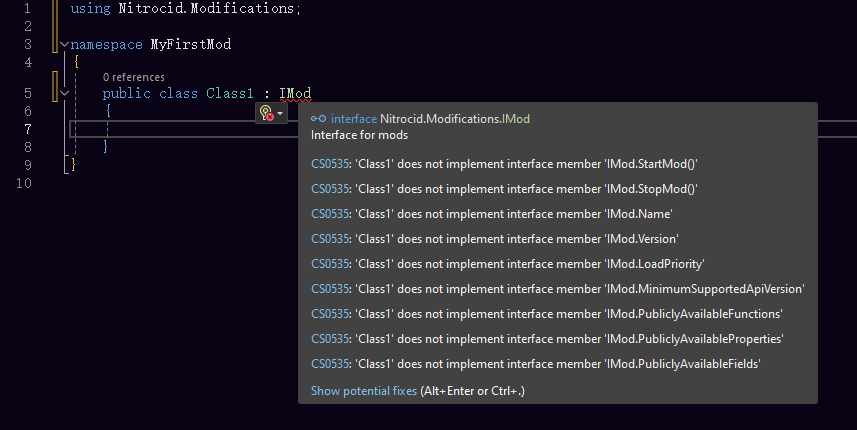
7. Write next to the class file `: IMod` and import the required namespace `by using Nitrocid.Modifications;`. You should see errors indicating that you have to implement the methods.

   <figure><img src="https://1720427397-files.gitbook.io/~/files/v0/b/gitbook-x-prod.appspot.com/o/spaces%2FJykbx4O47VXdoe2Rclr6%2Fuploads%2Fgit-blob-542a6c71451bc36dacae78a50b8422f4e00604e5%2F083-modbuild.png?alt=media" alt=""><figcaption></figcaption></figure>
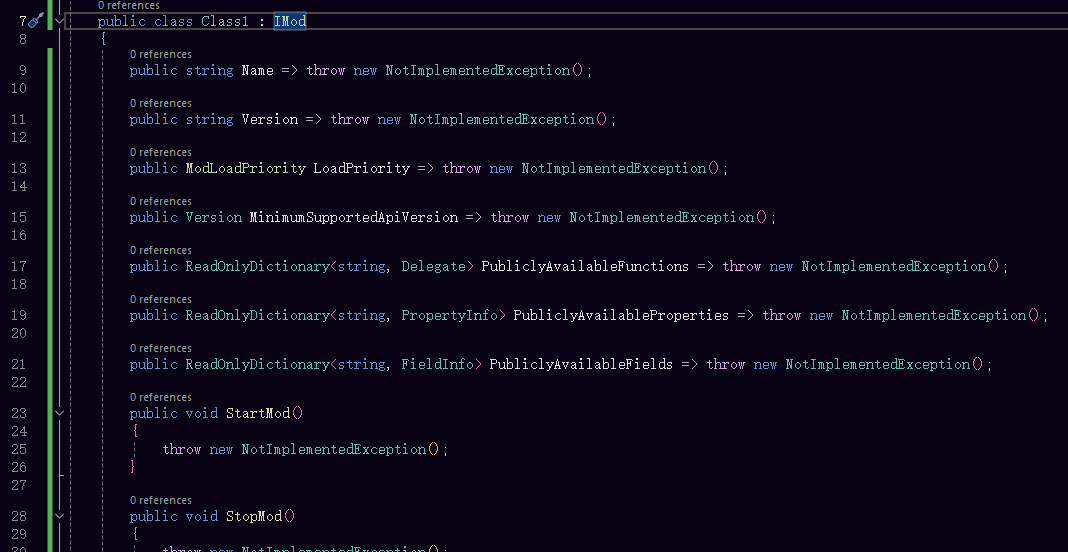
8. After implementation, you should see:

   <figure><img src="https://1720427397-files.gitbook.io/~/files/v0/b/gitbook-x-prod.appspot.com/o/spaces%2FJykbx4O47VXdoe2Rclr6%2Fuploads%2Fgit-blob-44e3abc64f9c5dabcfcd81e1b7f639dbbdf1eecd%2F084-modbuild.png?alt=media" alt=""><figcaption></figcaption></figure>
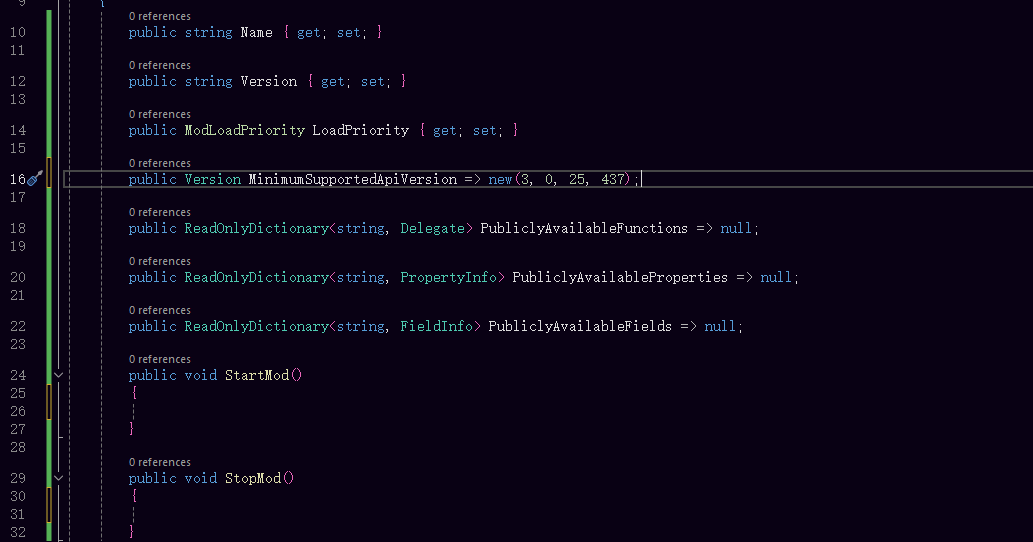
9. Remove all calls to `NotImplementedException` and set the minimum supported API version. Currently, we're at `v3.0.25.437`.

   <figure><img src="https://1720427397-files.gitbook.io/~/files/v0/b/gitbook-x-prod.appspot.com/o/spaces%2FJykbx4O47VXdoe2Rclr6%2Fuploads%2Fgit-blob-739c88b57e0cbda6f25124c72fd2a8df45403d53%2F085-modbuild.png?alt=media" alt=""><figcaption></figcaption></figure>
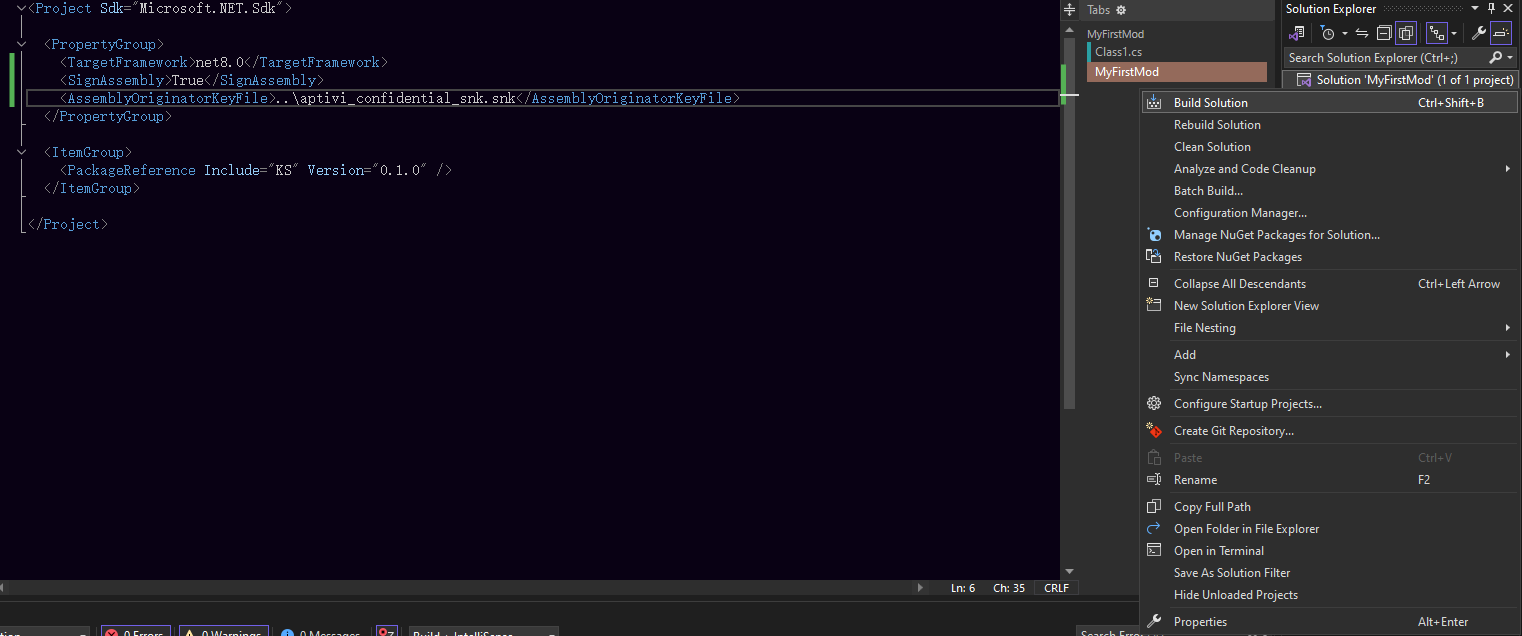
10. Now, implement everything as you wish. Once you're done, follow the steps on how to create a strong name signing key and [sign your mod](https://learn.microsoft.com/en-us/dotnet/standard/assembly/sign-strong-name). Then, click on the `Build` menu and select `Build Solution`.

    <div align="left"><figure><img src="https://1720427397-files.gitbook.io/~/files/v0/b/gitbook-x-prod.appspot.com/o/spaces%2FJykbx4O47VXdoe2Rclr6%2Fuploads%2Fgit-blob-e944264ed9f2dbfff95c7b138e89967a8ab2db31%2F086-modbuild.png?alt=media" alt=""><figcaption></figcaption></figure></div>
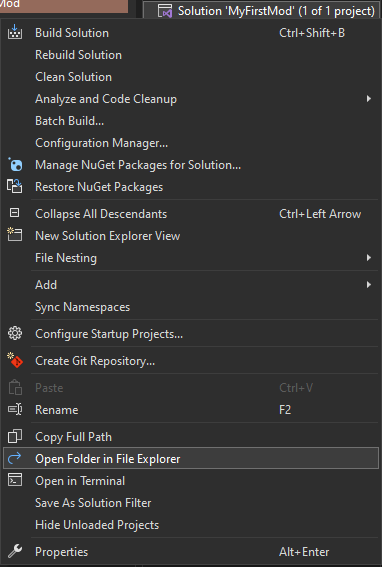
11. Once the solution is built, open the file explorer to the solution directory by right-clicking on the solution and selecting `Open Folder in File Explorer`.

    <div align="left"><figure><img src="https://1720427397-files.gitbook.io/~/files/v0/b/gitbook-x-prod.appspot.com/o/spaces%2FJykbx4O47VXdoe2Rclr6%2Fuploads%2Fgit-blob-c47ca8305b9b3467c1ae89e12a17a07b0cfe50fb%2F087-modbuild.png?alt=media" alt=""><figcaption></figcaption></figure></div>
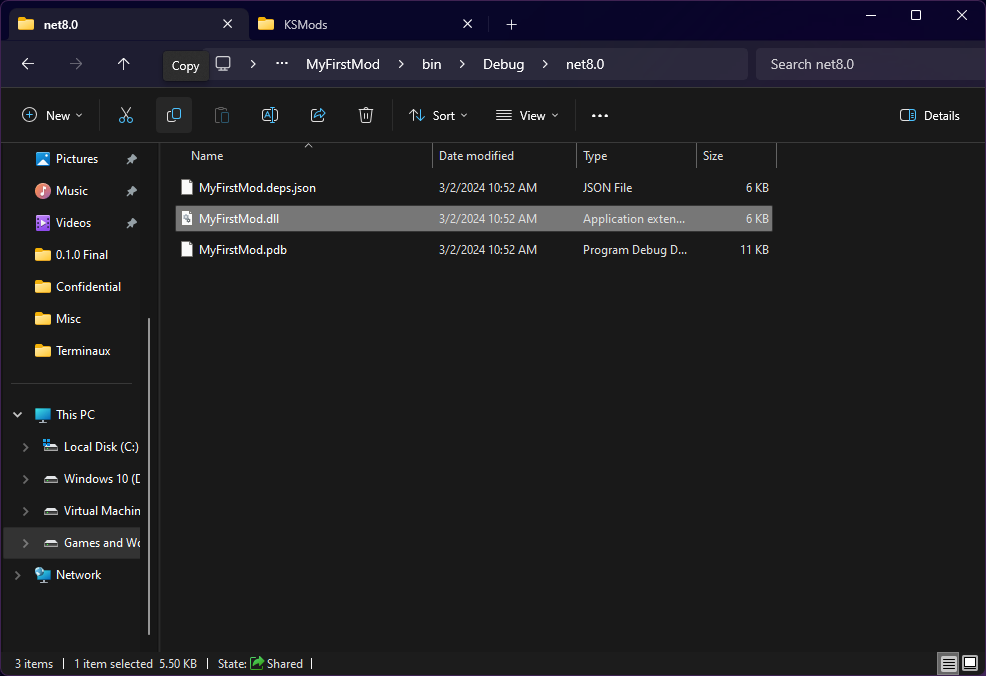
12. Navigate to the output directory and copy the `.dll` file to `KSMods` under the `%localappdata%/KS` folder.

    <figure><img src="https://1720427397-files.gitbook.io/~/files/v0/b/gitbook-x-prod.appspot.com/o/spaces%2FJykbx4O47VXdoe2Rclr6%2Fuploads%2Fgit-blob-e544b01b87676a6614d8a2d9d83e05a0c62765f1%2F088-modbuild.png?alt=media" alt=""><figcaption></figcaption></figure>
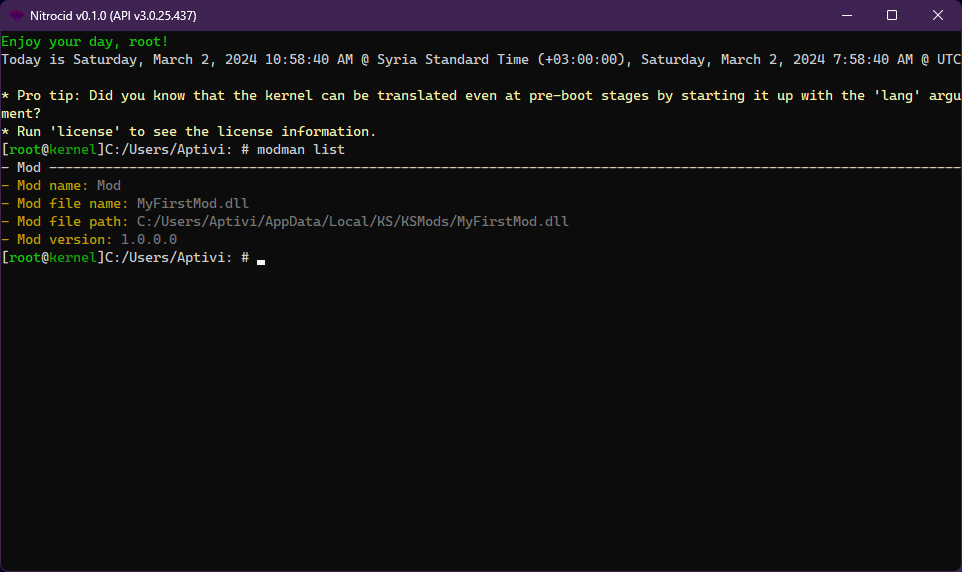
13. Open Nitrocid KS to test your mod. Ensure that `modman list` lists your mod.

    <figure><img src="https://1720427397-files.gitbook.io/~/files/v0/b/gitbook-x-prod.appspot.com/o/spaces%2FJykbx4O47VXdoe2Rclr6%2Fuploads%2Fgit-blob-fba70659b98cb6ae04558d41259f223205494f9b%2F089-modbuild.png?alt=media" alt=""><figcaption></figcaption></figure>

{% hint style="info" %}
You will have to turn on kernel modifications from the kernel settings. Navigate to `General > Start kernel modifications on boot` and turn it on.

You can also make use of the [`KSTemplates`](https://github.com/Aptivi/KSTemplates) repository, which can be installed to Visual Studio using the `dotnet new install path/to/KS.Templates.nupkg` command.
{% endhint %}