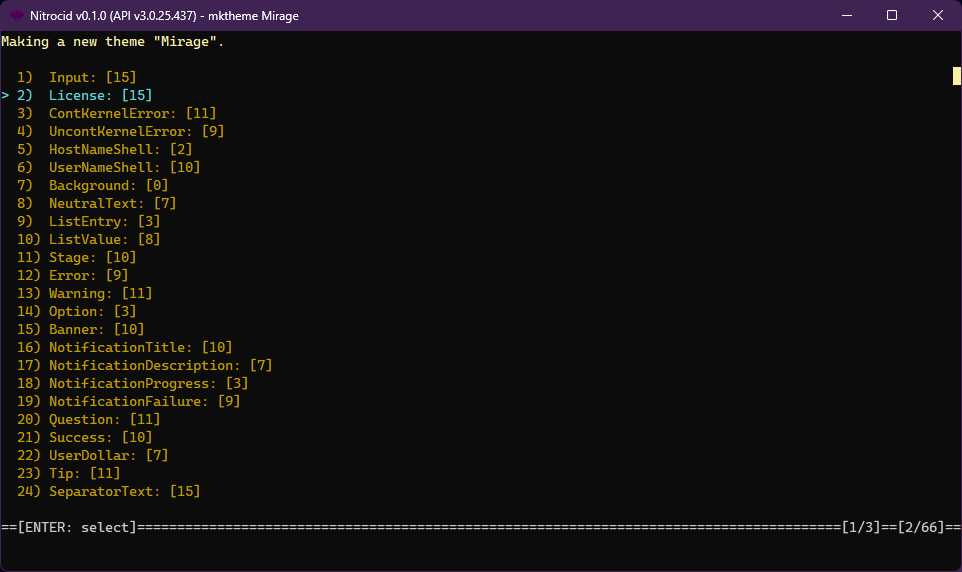
# Theme Studio
The theme studio allows you to make your own custom themes easily by letting you edit every single color type. It provides you with a fully-fledged color wheel provided by Terminaux to ensure that what you select is accurate and tailored to your needs. You can simply run this program by running the `mktheme ` command.
This saves you the need of manually making a JSON file containing theme data, whose specification can be found here:
{% content-ref url="../../../advanced-and-power-users/inner-workings/inner-essentials/theme-internals" %}
[theme-internals](https://aptivi.gitbook.io/deprecated/nitrocid-ks-v0.1.1-service-pack-3/advanced-and-power-users/inner-workings/inner-essentials/theme-internals)
{% endcontent-ref %}
Once you're done making your own theme, the theme studio provides you with these options:
* `Save Theme to Current Directory`: Saves the theme file to the current directory
* `Save Theme to Another Directory...`: Saves the theme file to a specified directory
* `Save Theme to Current Directory as...`: Saves the theme file to the current directory as another name
* `Save Theme to Another Directory as...`: Saves the theme file to a specified directory as another name
* `Load Theme From File...`: Loads a theme from a theme JSON file
* `Load Theme From Prebuilt Themes...`: Loads a theme from one of the pre-built themes
* `Load Current Colors`: Loads the current colors and undos any changes made.
* `Preview...`: Shows you a live theme preview as list of text
* `Exit`: Exits the application
Once you're done with the theme, the theme studio doesn't automatically save your theme file. Therefore, you'll have to manually save it by highlighting on the `Save Theme to Current Directory` option and selecting it. Select it by pressing `ENTER`.
{% hint style="info" %}
You can set your kernel theme to use your custom theme by executing the `themeset` command with the path to your theme JSON file as the first argument, such as `themeset Colorful.json`.
{% endhint %}
{% hint style="info" %}
Alternatively, you can launch the theme studio TUI by passing the `-tui` switch. Consult the keystrokes list by pressing the `K` key inside the TUI for help.
{% endhint %}